Day-04
Task: Basic Linux Shell Scripting for DevOps Engineers.
Introduction
What is Kernel?
What is Shell Scripting?
Explain in your own words and examples, what is Shell Scripting for DevOps.
What is `#!/bin/bash?` can we write `#!/bin/sh` as well?
Write a Shell Script which prints `I will complete #90DaysOofDevOps challenge`
Write a Shell Script to take user input, input from arguments and print the variables.
Write an Example of If else in Shell Scripting by comparing 2 numbers
Conclusion
Introduction
The #90DaysOfDevOps challenge is already on Day 4! We'll get into the fundamentals of Linux shell scripting today and discuss how DevOps engineers might benefit from it. Shell scripting is a potent ability that allows you to manage system settings, automate processes, accelerate and workflows of DevOps.
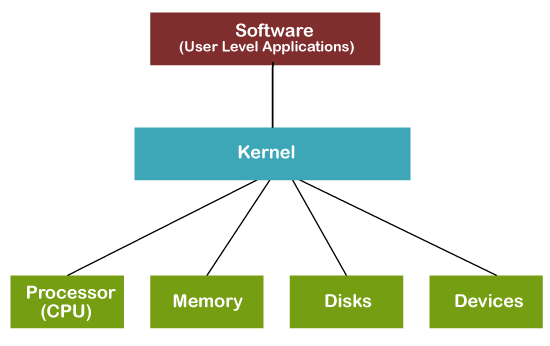
What is Kernel?
The kernel is a piece of software that serves as the central component of an operating system (OS). It acts as a bridge between the hardware and software layers of the system, facilitating communication and coordination between them. Essentially, the kernel is responsible for managing the computer's resources and providing an interface for applications to interact with the underlying hardware.
What is Shell?
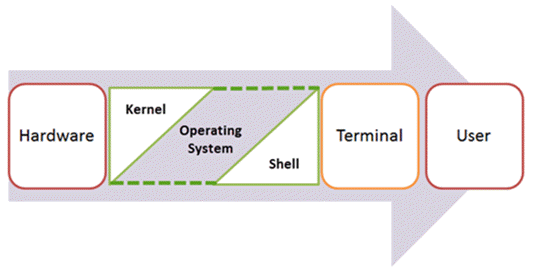
In the computer world, a shell is a user interface that provides access to the services and functions of the operating system. It acts as an intermediary between the user and the computer's kernel by accepting commands in the form of text and then executing them. When you open a terminal or command prompt, what you see is essentially a shell.
A shell allows the user to interact with the operating system through commands, scripts, and programs. By entering text-based commands, you can perform a variety of tasks, such as navigating the file system, launching applications, managing processes, and configuring system settings.
What is Linux Shell Scripting ?
In the Linux operating system, the shell is a command-line interpreter that acts as an interface between the user and the system's kernel. It enables users to interact with the system by executing commands, either typed directly into the shell or provided through scripts. A shell script is a collection of commands written in a scripting language that can be executed as a single unit.
Shell scripting is a vital skill for anyone working with Linux, as it allows for automating repetitive tasks, managing system configurations, and even creating complex programs with ease. It empowers users to harness the full potential of the command-line interface, making Linux an incredibly flexible and efficient operating system.
If you are new to Linux shell scripting, getting started may seem a bit intimidating. However, with a little practice and guidance, you will soon be able to navigate the world of shell scripts with confidence. Here are some steps to help you get started:
Choose a shell: The first step is to choose a shell to work with. The default shell on most Linux distributions is Bash (Bourne Again Shell), an enhanced version of the original Bourne shell. It is widely used and provides powerful scripting features.
Learn basic commands: Familiarize yourself with basic Linux commands. Understanding how the command-line interface works lays the foundation for your knowledge of shell scripts.
Study script syntax: Learn the syntax of the shell scripting language you have chosen. Shell scripting languages are not as complex as general-purpose programming languages, but they have specific syntax rules that you must follow.
Start small: Start with simple scripts to perform basic tasks. As you gain confidence and experience, you can move on to more complex and sophisticated projects.
Use online resources: there are numerous online tutorials, forums, and communities dedicated to Linux shell scripts. Use these resources to get advice, ask questions, and learn from others' experiences.
Q1 ] Explain in your own words and examples, what is Shell Scripting for DevOps.
Shell scripting for DevOps is the practice of using shell scripts to automate various tasks and processes in the context of DevOps (Development and Operations). DevOps aims to foster collaboration between software development and IT operations teams to enable continuous integration, continuous delivery, and faster software development cycles.
Shell scripting in this context means writing scripts in shell languages such as Bash (Bourne Again SHell) to perform repetitive, routine, and complex tasks related to building, deploying, and managing software applications. These tasks may include setting up development environments, configuring servers, deploying applications, managing infrastructure, and orchestrating various processes.
Q2] What is `#!/bin/bash?` can we write `#!/bin/sh` as well?
#!/bin/bash and #!/bin/sh are called "shebang" or "hashbang" lines in Unix-like operating systems. They are used to specify the interpreter to be used to run the script. The shebang line must be placed at the very beginning of a script file and starts with "#!" followed by the path to the interpreter.
#!/bin/bash: This shebang line indicates that the script should be executed using the Bash shell, a popular Unix shell and command language. Bash provides a variety of functions and is used as the default shell on many Linux distributions.
#!/bin/sh: This shebang line indicates that the script should be run with the system's default shell, which is often a symbolic link to the Bourne shell (sh) or a compatible shell such as Dash (Debian Almquist Shell) on some systems. The Bourne shell is simpler compared to Bash and may not have some of the advanced features of Bash.
Q3 Write an Example of If else in Shell Scripting by comparing 2 numbers
#!/bin/bash

# Enter two numbers
echo "Enter the first number:"
read num1

echo "Enter the second number:"
read num2

# Compare  two numbers
if [ "$num1" -eq "$num2" ]; then
    echo "The numbers are equal."
elif [ "$num1" -gt "$num2" ]; then
    echo "The first number is greater than the second number."
else
    echo "The second number is greater than the first number."
fi
Q4] Write a Shell Script to take user input, input from arguments and print the variables.
#!/bin/bash

# Enter input
echo "Enter a value:"
read user_input

# Arguments
arg1=$1
arg2=$2

# Print variables
echo "User input: $user_input"
echo "Argument 1: $arg1"
echo "Argument 2: $arg2"
chmod +x print_variables.sh
./print_variables.sh arg1_value arg2_value
Conclusion
In summary, mastering basic Linux shell scripts is an essential skill for DevOps engineers. The ability to write efficient shell scripts enables professionals to automate repetitive tasks, manage system configurations, and streamline deployment processes. With knowledge of shell scripts, DevOps engineers can orchestrate complex workflows, ensure scalability, and improve overall efficiency in software development and system management.
I recently completed my Bachelor's degree in Computer Science/Information Technology, where I gained a solid foundation in DevOps. I also received comprehensive training in various aspects of DevOps methodologies, including continuous integration, continuous deployment, and infrastructure automation.
Connect Vedantadhe19@gmail.com