Day-22 : Getting Started with Jenkins
What is Jenkins?
Jenkins is an open-source automation server used primarily for continuous integration and continuous delivery (CI/CD) processes in software development. It was originally created to help developers automate and streamline the building, testing, and deployment of their software projects. Jenkins has since become one of the most popular and widely adopted CI/CD tools in the software development industry.
Here's a breakdown of its key functionalities:
Continuous Integration (CI): Jenkins allows developers to automatically build and test their code whenever changes are committed to a version control repository (e.g., Git). This helps identify and address integration issues early in the development cycle.
Continuous Delivery (CD): Jenkins extends its capabilities to support continuous delivery, enabling the automated deployment of code to various environments (e.g., development, staging, production) after it has been successfully built and tested.
Extensibility: Jenkins is highly extensible and supports a vast ecosystem of plugins, which can be used to integrate it with a wide range of tools and services, including source code repositories, testing frameworks, and deployment platforms.
Automation: Jenkins allows users to define and execute complex automation workflows known as pipelines. These pipelines can include various stages, such as building, testing, deploying, and notifying team members of the build status.
Monitoring and Reporting: Jenkins provides detailed logs and reports for each build and pipeline run, helping teams identify issues quickly and enabling data-driven decisions in the development process.
Security: Jenkins offers features for securing access to its functionality, including user authentication, role-based access control, and integration with identity providers.
Scalability: Jenkins can be configured to run on distributed environments, allowing it to handle large-scale CI/CD workloads.
Community Support: Jenkins has a vibrant and active open-source community, which means frequent updates, bug fixes, and the availability of a wealth of documentation and community-contributed plugins.
Tasks:
What you understood in Jenkin, write a small article in your own words
Key Features:
Extensibility: Jenkins is highly adaptable, thanks to its vast library of plugins. It can integrate with numerous tools and services, customizing your development pipeline to suit your specific needs.
Automation: Jenkins' real power lies in its ability to create and execute sophisticated automation workflows, known as pipelines. These pipelines can automate building, testing, deployment, and even notifications, reducing manual error-prone tasks.
Monitoring and Reporting: Jenkins provides detailed logs and reports for every step in your pipeline, making it easier to spot issues and make informed decisions.
Security: Security is a top priority, with Jenkins offering user authentication, role-based access control, and integration with identity providers to protect your development processes.
Scalability: Whether you're a small team or a large organization, Jenkins can scale to meet your needs, distributing workloads across multiple servers.
Why Jenkins Matters:
Jenkins empowers development teams to focus on writing code while automating the repetitive and error-prone aspects of the development cycle. This leads to:
Faster development cycles: Jenkins shortens the time between writing code and getting it into the hands of users.
Higher code quality: Automated testing and integration catch issues early, reducing the likelihood of bugs reaching production.
Improved collaboration: Jenkins fosters a collaborative environment where developers can work together seamlessly.
Reliable deployments: With automated CD, deployments become predictable and consistent.
Task 2. Freestyle Pipeline: Saying "Hello World!"
Let's get hands-on! We'll create a simple Jenkins freestyle pipeline to print "Hello World!" 🌍
Install Jenkins: Set up Jenkins on your server or use the Jenkins Docker image.
Refer to the Link for installation : Jenkins Installation
Create a New Job:
Click "New Item" in Jenkins.
Enter a name for your project and select "Freestyle project."
Configure Your Job:
- In the job configuration, go to the "Build" section.
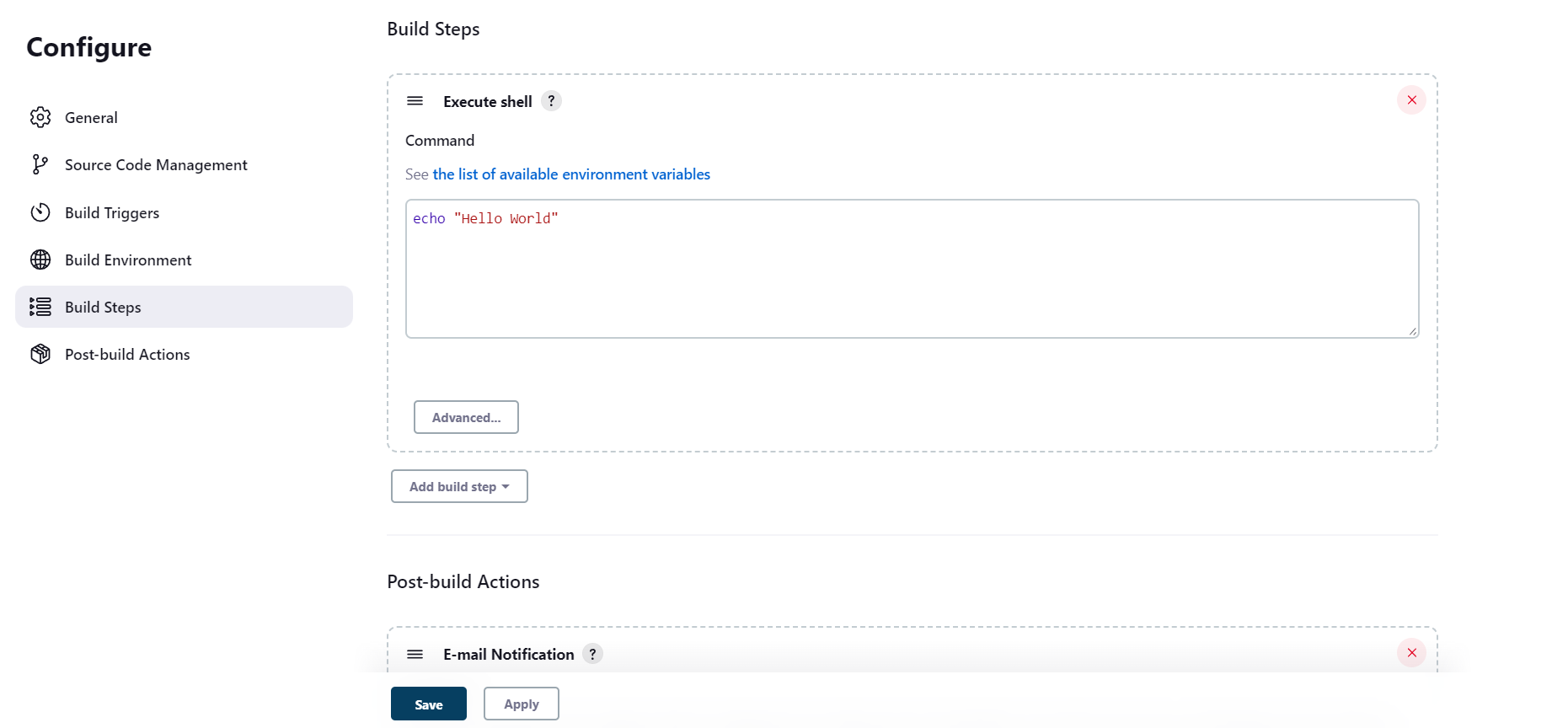
- Save and Build:
Save your job configuration.
Click "Build Now" to execute your pipeline.